
Skip to content

Export contacts

Export iPhone contacts to Excel, CSV or PDF

Apple's Contacts app shares contacts as vCard files, which Excel can't open as a table. Contacts Timeline turns your address book into a spreadsheet or a printable list in a few taps, with your newest contacts first.

Download on the App Store

For iPhone, iPad and iPhone Duo

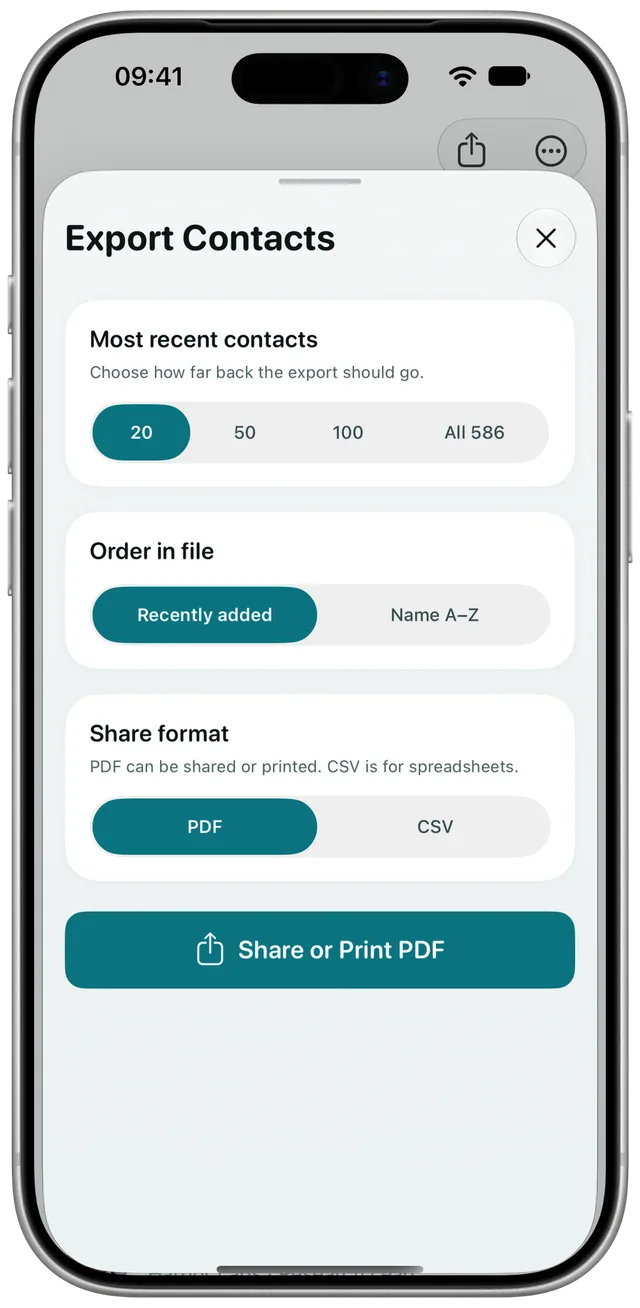
The Export Contacts sheet in Contacts Timeline with options for how many contacts, sort order and PDF or CSV

How to export your contacts

  1. 1

    Open Export Contacts

    In Contacts Timeline, tap the share button at the top of your timeline.

  2. 2

    Choose which contacts

    Pick your most recent 20, 50 or 100 contacts, or all of them. Sort the file by date added or by name.

  3. 3

    Share, save or print

    Choose CSV or PDF and tap Share. Save the file to Files, AirDrop it to your Mac, email it, or print the PDF.

Pick the format that fits

CSV

CSV for Excel and spreadsheets

One row per contact, ready to open in Excel, Numbers or Google Sheets. Contacts with several numbers or email addresses keep all of them, with their labels.

Columns in the file

  • Name
  • Phone Numbers
  • Email Addresses
  • Company
  • Job Title
  • Date Added
PDF

PDF to print or share

A clean list with names, numbers, email addresses and the date each contact was added. Print it from the share sheet or send it to someone who doesn't need a spreadsheet.

Export automatically with Shortcuts

Add the Export Contacts action to a shortcut or automation, for example to email yourself a CSV of the week's new contacts every Friday.

Export questions

How do I export contacts from my iPhone to Excel?

Open Contacts Timeline, tap the share button, choose how many contacts to include and pick CSV. Save or send the file, then open it in Excel. Each contact is one row.

Can I export only the contacts I added recently?

Yes. Export your newest 20, 50 or 100 contacts, sorted from the most recently added. You can also export all of them at once.

How do I print my iPhone contacts?

Export your contacts as a PDF, then tap Print in the share sheet. The PDF lists names, phone numbers, email addresses and the date each contact was added.

What does the CSV file include?

Name, phone numbers, email addresses, company, job title and the date each contact was added. When a contact has several numbers or addresses, they share one cell, each with its label.

Are my contacts uploaded anywhere when I export?

No. The file is created on your iPhone and goes only where you send it.

Find the person you just met

Contacts Timeline is on the App Store for iPhone, iPad and iPhone Duo.

Download on the App Store